반응형

Inner 클래스

다른 클래스 내부의 클래스 선언을 내부 클래스라고 합니다.

부모 객체가 없으면 자식 객체도 존재할 수 없습니다.

내부 클래스 객체가 존재하려면 외부 클래스 객체가 존재해야 합니다. 따라서 내부 클래스 객체는 외부 클래스 객체와 연결되어야 합니다.

다음 스크립트는 내부 클래스를 작성한 예제입니다.


class Scientist:

  def __init__(self):

    self.name = 'Dr. Kim'

    self.info = self.Info()   내부 객체 생성

  def method(self):

    print('Name:', self.name)


  class Info:                 내부 클래스 선언

    def __init__(self):

      self.height = 182

      self.weight = 70

      self.color = "Dark"

    def method(self):

      print('Height:{} Weight:{} Color:{}'.format(self.height, self.weight, self.color))


객체 생성

s = Scientist()   외부 객체 생성

s.method()

x = s.info        내부 객체 생성

x.method()


Output:

Name: Dr. Kim

Height:182 Weight:70 Color:Dark


상속

상속은 이미 정의된 클래스에서 새 클래스를 생성하는 방법입니다.

이미 정의된 클래스를 기본 클래스, 수퍼 클래스 또는 상위 클래스라고 하며 상속 받을 새 클래스를 하위 클래스, 파생 클래스 또는 자식 클래스라고 합니다.


has-a 관계

클래스에서 다른 클래스의 객체를 생성하여 다른 클래스에 있는 멤버에 액세스하는 관계입니다.


다음 스크립트는 has-a관계를 나타내는 예제입니다.


class P:

  x = 15

  def __init__(self):

    self.y = 25

  def method1(self):

    print('P class data')


class Q:

  def __init__(self):

    self.p = P()            # P 클래스 객체 생성

  def method2(self):

    print(self.p.x)         # p 객체로 P 클래스의 속성에 접근

    print(self.p.y)         # p 객체로 P 클래스의 인스턴스 멤버에 접근

    self.p.method1()        # p 객체로 P 클래스의 인스턴스 메서드에 접근


q = Q()

q.method2()


Output:

15

25

P class data


is-a 관계

상속의 주요 이점은 코드 재사용성 또는 기존 기능을 새로운 기능으로 확장하는 것입니다. 상위 클래스의 기능을 확장하려는 경우 상위 클래스의 메서드, 변수 및 생성자를 하위 클래스에 다시 작성할 필요가 없습니다.

다음 스크립트는 is-a관계를 나타내는 예제입니다.


class Side:

  def method1(self):

    print("Parent method-1")


class Guide(Side):     # Side 클래스 상속 받음

  def method2(self):

    print("Child method-2")


g = Guide()

g.method1()

g.method2()


Output:

Parent method-1

Child method-2


is-a vs has-a 관계

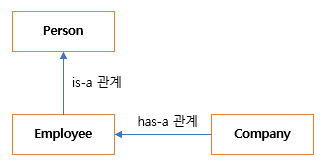
IS-A 관계를 사용하면 새 기능을 추가하여 기능을 확장할 수 있지만 HAS-A 관계에서는 새 기능으로 기능을 확장할 수 없습니다. 기존 기능만 사용할 수 있습니다.


다음 그림은 직원 클래스는 person 클래스의 기능을 확장하는 반면 직원 클래스는 확장하지 않고 회사의 기능만 사용하고 있습니다.
is-a vs has-a 관계


상속의 유형

1.    단일 상속(Single Inheritance)

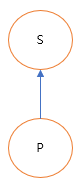
단일 상속은 한 클래스의 속성을 다른 클래스로 상속할 수 있습니다. 다음 그림은 클래스 S의 속성은 클래스 P에 상속될 수 있습니다.


def method1(self):class
 Parent:

    print("Parent Method")


class Child(Parent):

  def method2(self):

    print("Child Method")


c = Child()

c.method1()

c.method2()


Output:

Parent Method

Child Method


2.    다중 수준 상속(Multilevel Inheritance)

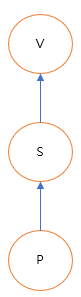
하나 이상의 부모 클래스를 포함하지만 다른 수준에 있는 상속을 다중 수준 상속이라고 합니다. 다음 그림은 클래스 V의 속성은 클래스 S에 상속되고 클래스 S의 속성은 클래스 P에 상속될 수 있습니다.
 

class Parent:

  def method1(self):

    print("Parent Method")


class Child(Parent):

  def method2(self):

    print("Child Method")


class SubChild(Child):

  def method3(self):

    print("Sub Child Method")


c = SubChild()

c.method1()

c.method2()

c.method3()


Output:

Parent Method

Child Method

Sub Child Method


3.    계층적 상속(Hierarchical Inheritance)

계층적 상속은 한 클래스의 속성은 같은 수준의 여러 클래스에 상속될 수 있습니다. 다음 그림은 클래스 P의 속성은 클래스 S와 클래스 V에 상속될 수 있습니다.
 

class Parent:

  def method1(self):

    print("Parent Method")


class Child1(Parent):

  def method2(self):

    print("Child-1 Method")


class Child2(Parent):

  def method3(self):

    print("Child-2 Method")


c1 = Child1()

c1.method1()

c1.method2()

c2 = Child2()

c2.method1()

c2.method3()


Output:

Parent Method

Child-1 Method

Parent Method

Child-2 Method


4.    다중 상속(Multiple Inheritance)

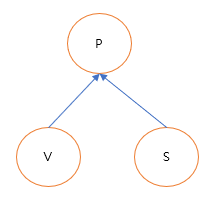
다중 상속은 하나 이상의 부모 클래스로부터 상속이 가능합니다. 이 경우 부모 클래스의 모든 메서드와 속성은 상속 후 자식 클래스에 표시됩니다. 다음 그림은 클래스 S와 클래스 V의 속성은 클래스 P에 상속됩니다.


class A:

  def method1(self):

    print("A class")


class B:

  def method2(self):

    print("B class")


class C(A, B):

  def method3(self):

    print("C class")


c = C()

c.method1()

c.method2()

c.method3()


Output:

A class

B class

C class


5.    하이브리드 상속(Hybrid Inheritance)

단일 상속, 다중 수준 상속, 다중 상속 및 계층적 상속을 결합한 것을 하이브리드 상속이라고 합니다. 다음 그림6은 하이브리드 상속의 예입니다.
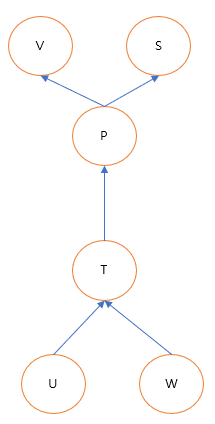
 

6.    순환 상속(Cyclic Inheritance)

순환 상속은 한 클래스의 속성을 다른 클래스에 순환적으로 상속할 수 있습니다.



반응형
반응형

클래스 상속(Class Inheritance)

클래스는 상속을 통해 다른 클래스의 멤버 메서드 및 속성과 같은 특성을 상속할 수 있습니다.

다른 클래스를 상속하는 클래스를 자식 클래스라고 합니다. 반면에 다른 클래스에 의해 상속된 클래스를 부모 클래스라고 합니다.

자식은 여러 부모 클래스에서 상속할 수 있지만 부모 클래스는 여러 자식 클래스에서 상속될 수 있습니다.


Python에서 상속의 간단한 예를 살펴보겠습니다. 다음 스크립트에서 하나의 메서드 display_text() Parent 클래스를 정의합니다. 그리고 Parent 클래스를 상속하는 Child라는 자식 클래스를 선언합니다.

클래스에서 상속하려면 자식 클래스 이름 뒤에 오는 괄호 안에 부모 클래스 이름을 전달하기만 하면 됩니다.


여기서, pass 키워드는 코드가 구문상 필요는 하지만 프로그램이 아무 작업도 하지 않기를 원하는 경우 사용합니다.

클래스나 함수에서 pass키워드를 사용하는 경우 클래스가 내부 동작은 필요없고, 의미적으로 껍데기만 필요한 경우에 사용합니다. 아래 스크립트의 chile클래스는 내부에 속성이나 메서드가 하나도 없이 빈 껍데기의 클래스를 만들었습니다.


class Parent:

  def display_text(self):

    self.id = 10

    print("A function inside the parent class")


class Child(Parent):

  pass


child클래스의 객체를 만들고 부모 클래스 내의 메서드인 display_text()함수와 id를 호출한 결과입니다. 출력은 display_text() 메서드가 Child 클래스 내부에 정의되어 있지 않더라도 Child 클래스 객체에서 display_text() 메서드를 성공적으로 호출할 수 있음을 보여줍니다.


child = Child()

child.display_text()

print(child.id)


Output:

A function inside the parent class

10


클래스 상속 예제

자식 클래스와 부모 클래스 사이에는 is-a 관계가 있습니다. 상속의 기본 개념은 다양한 클래스 간에 공통되는 멤버 속성 및 메서드를 부모 클래스 내부에 그룹화할 수 있고 자식 클래스에 고유한 멤버 및 속성을 자식 클래스 내부에 구현할 수 있다는 것입니다.


다음 스크립트는 두 개의 속성 name area와 하나의 메소드 display_shape_attr()이 있는 Shape라는 클래스를 생성합니다.

class Shape:

  def set_shape_attr(selfnamearea):

    self.shape_name = name

    self.area = area


  def display_shape_attr(self):

    print("The shape name is ", self.shape_name)

    print("The shape area is "self.area)


Shape 클래스를 상속받는 두 개의 자식 클래스를 만들어 보겠습니다. 첫 번째 클래스는 원의 반지름(radius) 속성이 있고 반지름 값을 표시하는 메서드를 갖는 Circle클래스를 만들었습니다. Circle Shape 클래스 사이의 관계는 Circle is-a Shape인 것처럼 is-a입니다.


class Circle(Shape):

  def set_circle_attr(selfradius):

    self.radius = radius


  def display_circle_attr(self):

    print("The radius of the circle is ", self.radius)


Shape 클래스를 상속하는 Square라는 또 다른 클래스를 만들어 보겠습니다. Square 클래스에는 꼭지점 개수 속성과 이 꼭지점 값을 표시하는 메서드로 구성되어 있습니다.


class Square(Shape):

  def set_square_attr(selfvertices):

    self.vertices = vertices


  def display_square_attr(self):

    print("Total number of vertices in a square ", self.vertices)


Circle Square 클래스에는 모두 name area라는 두 가지 공통 속성이 있음을 알 수 있습니다. 공통 속성은 부모 클래스인 Shape 클래스에서 구현되었습니다. 반경 및 꼭짓점과 같은 특정 속성은 각각 Circle Square 클래스에서 구현됩니다.

다음 스크립트는 Circle 클래스의 객체를 생성하고 이름, 면적 및 반경 속성 값을 표시합니다.

circle = Circle()


# calling parent class methods

circle.set_shape_attr("Circle", 200)

circle.display_shape_attr()


# calling child class methods

circle.set_circle_attr(500)

circle.display_circle_attr()


Output:

The shape name is  Circle

The shape area is  200

The radius of the circle is  500


마찬가지로 다음 스크립트는 Square 클래스의 객체를 생성하고 이름, 면적 및 꼭지점 개수 속성의 값을 표시합니다.

square = Square()


# calling parent class methods

square.set_shape_attr("Square", 230)

square.display_shape_attr()


# calling child class methods

square.set_square_attr(4)

square.display_square_attr()


Output:

The shape name is  Square

The shape area is  230

Total number of vertices in a square  4


자식클래스를 통해 부모 클래스의 생성자 호출하기

부모 클래스와 자식 클래스 모두에서 생성자를 정의할 수 있습니다. 그런 다음 자식 클래스 생성자를 사용하여 부모 클래스 생성자를 초기화할 수 있습니다.

다음 스크립트는 Shape라는 상위 클래스를 정의합니다.


class Shape:

  def __init__(selfnamearea):

    self.shape_name = name

    self.area = area


  def display_shape_attr(self):

    print("The shape name is ", self.shape_name)

    print("The shape area is ", self.area)


다음 스크립트는 Shape 상위 클래스를 상속하는 Circle 하위 클래스를 정의합니다. Circle 클래스의 생성자를 보십시오. 이름, 면적 및 반경의 세 가지 매개변수를 사용하였습니다.

생성자 내에서 super() 키워드는 상위 클래스를 참조하는 데 사용됩니다.

상위 클래스 생성자는 super().__init__() 메서드를 사용하여 호출되고 circle클래스의 __init__()에서 입력받은 name area 매개변수의 값은 상위 클래스 생성자에 전달됩니다. 세 번째 매개변수는 자식 클래스 속성, 즉 반경을 초기화합니다.

class Circle(Shape):

  def __init__(selfnamearearadius):

    부모 클래스의 생성자를 호출

    super().__init__(name, area)

    self.radius = radius


  def display_circle_attr(self):

    print("The radius of the circle is ", self.radius)


이제 Circle 클래스의 개체를 만들 때 세 개의 매개변수 값을 전달합니다. 처음 두 매개변수 값은 부모 클래스 속성인 name area를 초기화하는 반면, 세 번째 매개변수는 자식 클래스 속성인 radius를 초기화합니다.

circle = Circle("Circle", 700, 400)


# calling parent class methods

circle.display_shape_attr()


# calling child class methods

circle.display_circle_attr()


Output:

The shape name is  Circle

The shape area is  700

The radius of the circle is  400

반응형
반응형

객체지향 프로그래밍(Object-Oriented Programming)

객체 지향 프로그래밍은 실제 객체의 관점에서 소프트웨어를 모델링하는 프로그래밍입니다.

객체라는 용어는 속성이 있고 일부 기능을 수행할 수 있는 모든 것을 나타냅니다. 객체 지향 프로그래밍에서는 어떤 속성을 갖고 어떤 기능을 수행할 수 있으면 객체로 모델링 할 수 있습니다.


예를 들어 비행 시뮬레이터 게임을 개발 중이라면 비행기의 다음과 같은 속성과 기능을 확인할 수 있으므로 객체로 모델링 할 수 있습니다.

속성 : 비행기의 모델, 이름, 엔진 수

기능 : 비행기 시작, 비행기 정지, 비행기 이동


유사하게, 조종사는 비행기와 다른 속성과 기능을 가지고 있으므로 객체로 모델링 될 수 있습니다.

속성 : 조종사의 이름, 나이, 성별

기능 : 비행기 탑승, 비행기에서 내리기, 좌석 변경


클래스 정의와 객체 생성

객체를 생성하기 전에 클래스를 먼저 생성해야 합니다. 클래스는 객체에 대한 지도나 청사진으로 생각할 수 있습니다. 클래스와 객체의 관계는 계획과 집의 관계와 유사합니다. 평면도를 보면 그 집에 몇 개의 침실, 식당, 화장실 등이 있을 것인지 알 수 있습니다. 마찬가지로 클래스를 보면 객체의 속성과 기능을 알 수 있습니다. 단일 클래스를 사용하여 여러 개체를 만들 수 있습니다.


클래스를 생성하려면 class 키워드 뒤에 클래스 이름과 세미콜론을 사용해야 합니다. 다음 스크립트는 class_method()함수를 하나 갖는 NewClass라는 클래스를 생성해 보았습니다.


class NewClass:

  def class_method(self):

    print("Hello this is a method inside a class")


클래스의 객체를 생성하려면 클래스 이름 뒤에 한 쌍의 괄호를 작성해야 합니다. 다음 스크립트는 NewClass 클래스에 대해 nc라는 개체를 만듭니다. nc 객체를 사용하여 새 클래스의 함수(메서드)를 호출할 수 있습니다. 이렇게 하려면 아래와 같이 점 연산자 다음에 이름을 추가해야 합니다.


nc = NewClass()

nc.class_method()


Output:

Hello this is a method inside a class


클래스에 변수와 메서드 선언

객체는 속성과 메서드를 가질 수 있습니다. 속성과 함수가 있는 객체를 생성하려면 해당 속성과 메서드를 해당 클래스에 추가해야 합니다. 클래스 내부에 정의된 속성 및 메서드를 멤버 속성 및 멤버 메서드라고 합니다.


다음 스크립트는 하나의 멤버 메서드 class_method()와 두 개의 멤버 속성 color id를 사용하여 클래스를 만들었습니다.

Python에서는 인스턴스 메서드의 첫 번째 속성으로 self를 전달해야 합니다. 인스턴스 메서드는 클래스 객체를 사용하여 액세스할 수 있는 메서드입니다. 마찬가지로 인스턴스 변수를 생성하려면 인스턴스 메소드 내부에 이러한 변수를 정의해야 하며 속성 이름 앞에 키워드 self를 접두사로 붙여야 합니다.


class NewClass:                # class 선언

  def class_method(self):      # 멤버 메서드

    self.color = 'red'         # 멤버 변수

    self.id = 24

    print("Hello this is a method inside a class")


다음 스크립트는 NewClass 클래스를 nc 객체로 만들고 nc객체를 통해서 NewClass클래스 안의 메서드나 속성에 접근하는 예제입니다.

nc = NewClass()

nc.class_method()

print(nc.color)

print(nc.id)


Output:

Hello this is a method inside a class

red

24


단일 클래스에서 여러 개체를 만들 수 있습니다. 다음 스크립트에서는 동일한 NewClass 클래스를 사용하여 다른 개체 nc1nc2를 정의하고 해당 클래스의 멤버 메서드 및 멤버 특성에 액세스합니다. 여기서, nc1nc2 colorid속성 값은 동일합니다. 일반적으로 동일한 클래스의 다른 객체에 대한 인스턴스 멤버의 값은 다릅니다.


nc1 = NewClass()

nc2 = NewClass()

nc1.class_method()

print(nc1.color)

nc2.class_method()

print(nc2.color)


Output:

Hello this is a method inside a class

red

Hello this is a method inside a class

red


다음 스크립트는 멤버 메서드 class_method() color id 속성에 값을 할당하는 데 사용되는 두 개의 매개 변수 값을 받는 클래스를 만들어 보았습니다.


class NewClass:               

  def class_method(selfmy_colormy_id):

    self.color = my_color

    self.id = my_id

    print("Hello this is a method inside a class")


nc1nc2객체를 만들고 NewClass클래스의 class_method()함수를 호출하고 함수의 매개변수에 각각 다른 값을 입력해 준 후 클래스의 color속성을 출력해 보면 객체로 호출할 당시의 함수의 매개변수로 입력했던 값이 출력됩니다.


nc1 = NewClass()

nc1.class_method("Green", 18)

nc2 = NewClass()

nc2.class_method("Red", 22)

print(nc1.color)

print(nc2.color)


Output:

Hello this is a method inside a class

Hello this is a method inside a class

Green

Red


class_method의 매개변수는 self, my_color, my_id 3개를 입력 받습니다. 그런데 일반 함수와 달리 메서드의 첫번째 매개변수는 self는 특별한 의미를 갖습니다.

클래스에서 인스턴스 메서드를 정의할 때는 self를 사용하였지만 실제 객체를 선언해서 이 메서드를 호출할 때는 self를 제외한 2개의 매개변수만 사용됩니다.

다음 그림처럼 nc1.class_method(“Green”, 18)을 호출하면 class_method메서드의 첫 번째 매개변수 self에는 class_method()를 호출한 객체 nc1이 자동으로 전달됩니다.


클래스 생성자

생성자는 클래스의 객체를 생성할 때 자동으로 호출되는 함수입니다. 생성자 함수의 이름은 항상 __init__()입니다.

클래스의 객체를 생성하는 것을 클래스 초기화라고도 합니다.


다음 스크립트는 color id 속성을 초기화하는 데 사용되는 두 개의 매개변수 값을 허용하는 생성자 메서드를 사용하여 클래스를 만듭니다. 이 클래스에는 color id 속성 값을 표시하는 display_vars() 메서드도 포함되어 있습니다.


class NewClass:             

  def __init__(selfmy_colormy_id):

    self.color = my_color

    self.id = my_id


  def display_vars(self):

    print(self.color)

    print(self.id)


사용자 정의 생성자가 있는 클래스의 개체를 만들 때 클래스 이름 뒤에 오는 괄호를 사용하여 생성자 매개변수의 값을 전달해야 합니다.

다음 스크립트는 NewClass 클래스에 대한 객체 nc1을 생성합니다. 생성자에 전달되는 값은 Yellow10입니다. 이 값은 각각 nc1 객체의 color id 속성에 할당됩니다. 생성자를 사용하면 추가 메서드를 정의하지 않고도 멤버 속성을 초기화할 수 있음을 알 수 있습니다.


nc1 = NewClass("Yellow", 10)

nc1.display_vars()


Output:

Yellow

10


클래스 멤버 vs 인스턴스 멤버

파이썬의 객체 지향 프로그래밍에서 클래스 멤버 속성과 메서드, 인스턴스 멤버 속성과 메서드의 차이점을 이해하는 것은 매우 중요합니다.


클래스 속성 및 메서드

클래스 속성은 클래스 이름을 통해 액세스할 수 있는 속성이며, 그 값은 다른 객체 간에 공유됩니다.

클래스 속성은 생성자 외부에서 선언됩니다.

클래스 메서드는 클래스 이름을 통해 액세스할 수 있는 메서드입니다.

클래스 메서드에는 매개변수 값이 포함되어 있지 않습니다.


인스턴스 속성 및 클래스

인스턴스 속성은 인스턴스(객체)에 고유한 속성이며 클래스의 다른 객체 간에 공유되지 않습니다. 클래스의 각 개체에는 인스턴스 변수의 복사본이 있습니다.

인스턴스 속성은 인스턴스 이름을 통해서만 액세스할 수 있습니다.

인스턴스 속성은 인스턴스 메소드 내에서 선언됩니다.


다음 스크립트는 하나의 클래스 속성 num_objects와 두 개의 인스턴스 속성 color id를 사용하여 NewClass라는 새 클래스를 만듭니다. 이 클래스에는 생성자, 클래스 메서드 show_object_counts() 및 인스턴스 메서드 display_vars()도 포함되어 있습니다.

NewClass 클래스의 객체가 생성될 때마다 생성자는 인스턴스 속성인 color id의 값을 초기화합니다. 생성자는 클래스 속성 num_objects의 값을 1씩 증가시킵니다. 인스턴스 메서드 display_vars()는 인스턴스 속성 color id의 값을 표시합니다. show_object_counts() 클래스 메서드는 객체 counts 변수의 값을 표시합니다.


class NewClass:        

  num_object = 0    # class variable


  def __init__(selfmy_colormy_id):  # constructor

    self.color = my_color               # class member variable

    self.id = my_id                     # class member variable

    NewClass.num_object += 1


  def display_vars(self):               # instance method

    print(self.color)

    print(self.id)


  def show_object_counts():             # class method

    print("Number of objects:", str(NewClass.num_object))


NewClass 클래스의 첫 번째 객체를 생성하면 다음 스크립트와 같이 num_objects 값이 1로 증가합니다.


nc1 = NewClass("Yellow", 10)            # creating a class object

nc1.display_vars()                           # calling instance method

NewClass.show_object_counts()         # calling class method


Output:

Yellow

10

Number of objects: 1


NewClass 클래스의 두 번째 객체를 생성하면 클래스 변수 num_objects의 값은 모든 객체 간에 공유되므로 이전 1에서 1이 더해져 2가 됩니다.


nc2 = NewClass("Black", 12)            # creating a class object

nc2.display_vars()                          # calling instance method

NewClass.show_object_counts()        # calling class method


Output:

Black

12

Number of objects: 2

반응형

+ Recent posts